Showing posts with label windows. Show all posts

Wednesday, 27 April 2016

Get Skype Unlimited Calls For Free


Get Skype Unlimited Calls For Free

In this post you'll learn how to get free unlimited calls on Skype leave a post to see the hidden content, there's no thanks button. Sad

Go to: Click Here

Click on the ( Get Your Free Month  ) and you'll be directed to the sign in page. After that you'll have to use your PayPal account for verify or an debit credit card. Just use a virtual credit card that you might found all around the net for free.

Now you'll have unlimited calls on Skype for one month free with no charge!

Any form of thanks are highly appreciated.

If You Still Need Help Use Comments Box

Friday, 22 April 2016

How To Use Facebook Messenger Group Calling With Up To 50 People


At its F8 developer conference, Mark Zuckerberg explained Facebook’s 10 year roadmap. In the shorter version of Facebook’s roadmap for the next 5 years, Facebook Messenger took a prominent seat. To make Messenger more advanced, the social networking website rolled out Messenger Bots to let the users easily interact with businesses and different services.
Facebook’s Messenger service has about 900 million active users every month and the company is looking for ways to increase this number. To make it a complete communications solution for you, Facebook has now announced the rollout of group calling.

I already use the Messenger Calling feature from time to time but I prefer Skype and Google Hangout due to its group calling facility. Now, with the new addition, Messenger has become a complete Skype and Hangouts competitor.
Facebook began offering voice calling facility in 2013 and it was rolled out for everyone in April 2014. Last year, Facebook CEO Mark Zuckerberg announced that Messenger is making 10% of all the mobile VoIP calls globally.
After ignoring options of making money from Messenger for years, it looks like Facebook is looking to make the service even bigger and popular to make it really profitable when the time comes. In another similar step to push messaging on Facebook, the company started to allow all Facebook users to chat with each other even if they aren’t friends.
Facebook has announced that the update will be rolled out over the next 24 hours. Currently, you can have as much as 50 people in one group call. This big number shows that the social networking website is targeting the business crowd with this new rollout. While you might not need to talk to 50 people simultaneously, it’s worth checking out to chat with your friends and family.

How to use Facebook Messenger Group Calling feature?

If you are wondering how to use Facebook Messenger group calling feature, let me tell you that it’s as simple as group calling on Skype or Hangout.
All you need to do is open any group on Facebook. Look for the Phone icon in the top right and just tap on it. You’ll get a popup prompting you to start a group call and options to choose the group members who can join once the call begins.
After choosing people, you need to hit the Start Call button. At any time, you can see who is in call and who is not.
This voice calling capability in Messenger is rolling out over the next 24 years. If you are not having the feature yet, make sure that you are running the latest version of Facebook Messenger app. I tried Messenger group calling and the call quality was just same as the normal one-to-one Messenger call.
The only feature that’s still missing is the group video calling and we can expect this missing feature to come soon. With that addition, Facebook Messenger could easily serve as an alternative to Skype and Google Hangout as it’ll allow you to make easy conference calls with people whose numbers you don’t have.
Whoever might be the winner in the VoIP race, this could surely mean the end of vintage telephonic voice calling as we know it.

Tuesday, 19 April 2016

How To Use Facebook’s Messenger Bots Right Now?


How To Use Facebook’s Messenger Bots Right Now?

If you are scratching your brains wondering how bots on Facebook look like and how do they operate, calm down. These are simple bots dedicated to a particular service and you can use them right now.
But, at the moment, they are pretty confusing and unintuitive. Many times the bots don’t know what to do and you end up struggling getting any work done.
To make things easier for you, I tried Facebook Messenger Bots myself. I started with Facebook’s very own F8 bot. You can access it via m.me/f8bot. As you visit this URL on your phone, you’ll be asked to choose Messenger or Facebook app to proceed.
I chose Messenger and here are the screenshots of my chat with F8 Messenger Bot.
                              

Next, I decided to try out another Facebook Messenger Bot that was showed off during the F8 keynote. Yes, I’m talking about Poncho, the weather-bot that pretends to be a cat. Chatting to Poncho was better than my F8 bot experience. You can access Poncho via http://m.me/hiponcho.
You can find Poncho and other bots like CNN, WSJ etc. at botlist.co and use them right away.
Here’s how my chat with Poncho turned out:


Saturday, 2 April 2016

Install .NET Framework 3.5 in Windows 8 (or above) without internet.

Hi Guys , Welcome to UserX : The Dark Net ,

Today we're going to show you how to install .NET framework (used for running some apps on your PC)
So you just installed the Windows 8 ,8.1, or 10. And try to run any app which requires .NET framework 3.5 or more , but you are on limited network so this trick is obiviously for you guys.


So let back to the point.
All you have to do is , just insert the DVD or USB which you used to install the new version of Windows. (or if you used the ISO image to install windows just mount it.)


So here's my mounted drive as DVD Drive(H:)
Note :- It might be diffrent drivew in your case , let it be X


So now just open CMD using administrative rights ;

and paste the following command


Dism /online /enable-feature /featurename:NetFx3 /All /Source:X:\sources\sxs /LimitAccess


Now , it will show a message like "Enabing Feature with some Percentage of completion"
Just wait for two or three minutes and it will be completed in that time.


Again just make sure you have to put your Drive letter instead of X , and still if you face any problem , let us know in the comment section.


Thanks and keep visiting for new hacks...... :)

Thursday, 31 March 2016

HOW TO SET WHATSAPP PROFILE PICTURE WITHOUT CROPPING

Hello friends today I will tell you how you can set your whatsapp profile dp without crop. generally when we are set any profile dp on whatsapp firstly it says to crop the picture and then set. But now I have a trick by which you can set whatsapp profile dp without cropping. Follow below steps:

How to Set Up Whatsapp Profile Picture without cropping

At First, Install #SquareDroid — Full Size Photo app from here Download


After Successfully install, Now open the app, & you will see a Full menu in it. about “Pick a Photo” “Take a Photo” “Settings” etc.
Then Choose “Pick a Photo” option from here & It will show full menu, now select picture which you wanna set as profile picture without decreasing it’s size.
It will Automatically Resize That Picture & Picture will Crop instantly, Without Loosing anything in pic, & Pic will remains full & will not looks ugly after resize it.
So After Crop, Now Save the Picture in the Gallery & Open Whatsapp, & Set newly Created profile Picture Without loosing size.

Friday, 18 March 2016

How to install external apps on NOKIA 220 and NOKIA 225.

HELLO Guys ,WELCOME.TODAY ,I am going to show you how to install apps on NOKIA 220 and 225.

I have seen a lot of people getting trouble in finding and installing apps for their Nokia 225 & 220. To help them I made this beautiful tutorial, explaining everything about the phone.If you bought this phone then you may know that you cannot install any java based application in it. But why?

IT is so because,Nokia 225 and 220 uses 30+ series Operating system for mobile devices, which is not a Java OS and it is compiled using C and C++. As a result, you cannot install any Java (.jar) apps.

Nokia 30+ series is an operating system which is developed and used by only MICROSOFT. These mobiles are powered by mediatek chipest.
  • These Phones use MRE apps and the Default file extension of Nokia series 30+ is .Vxp.
Some apps may not work.This is a RAR FILE.

Download: https://drive.google.com/file/d/0B6-j2v8pzJM_VTdRMXIxaWI2dEk/view?usp=sharing  


HERE IS A PROOF OF THIS:

ENJOY BY USERX TEAM.


Sunday, 14 February 2016

How To Browse The Web Anonymously.

Hey Guys , Welcome To UserX , We are back with another Amazing trick to browse the web , without letting your information (The sites you visit, fake location,and with different IP address ).

As you all know when you browse the web these information about you are being detectable by your ISP,
1. Your location (With Your IP address ).
2. The sites You visit.
3. If you are in college or school , you cant not browse some sites banned by your institution socities.
4. Monitoring your device with your IP address.


In most of the cases , your ISP's are able to track you down just because of your IP address , which is a unique address to locate you on the earth.
But what if that IP address is changes ??
Simple : Your ISP can not track you.

This is what called Proxy Server.(connecting to the web , from different servers ).

In this case , your IP address will be changed , even your ISP, and you will be anonymous to the Web(as your location is different , your IP is different  )


This all you need to know about being  Anonymous.
But the question is how to do that ?

The Best answer is to use some Application , which provide you on the go feature an get anonymous by one click.


Best know app is  Betternet. As it is cross platform is can be used on mobile device and even on PC.
The links are below

1. For Android Click Here
2. For iPhone Click Here
3. For Windows Click Here


And if you don't want to download the App in your computer or your OS is not supported , You can add addon's  for your Web Browser

1. For Chrome Click Here
2. For Firefox  Click Here.

Thank You.

Saturday, 13 February 2016

(Loot) Paytm Tricks To Get Unlimited Free Recharge Using NEW50 Promo Code!

Paytm unlimited recharge tricks February 2016. Get unlimited free recharge using NEW50 promo code. [Working again]
After so many days, we have got success to reveal Paytm tricks. We have already looted Paytm using FREE25 & FREE10 promo code. Now it’s the time to loot through NEW50 promocode. Without wasting more times lets see how to get unlimited free recharge / talktime from Paytm ?

Paytm NEW50 Promo Code Tricks

  1. Download Paytm app
  2. Enter new mobile number, new email id, password & sign up a brand new account. You need to verify both mobile & email.
  3. Now use paytm wallet app & send Rs 50 to the newly created account from your old paytm account. Or directly add Rs 50 using any payment method.
  4. Now go to recharge mobile with Rs 50 & apply promo code NEW50
  5.  
    Paytm tricks using new50
  6. Complete your transaction using wallet balance
  7. That’s it. Your Rs 50 recharge will be successful instantly
  8. Rs 50 cashback will also be added within 1 hour
  9. Now it’s the main trick time
  10. Now again make a new paytm account using new mobile & email
  11. Now send Rs 50 (from previous paytm account where you got Rs 50 cashback)to the new paytm account
  12. Again recharge with Rs 50 using NEW50 promo code & complete transaction through wallet balance
  13. You will get Rs 50 cashback again to this account
  14. In this way keep making new paytm account as many as you can & get Rs 50 free recharge from every account.
Have any problem ? Feel free to say in comments. 

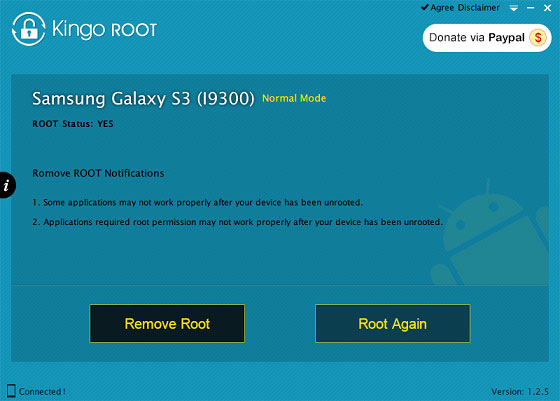
Kingo Root Cracked!

Kingo Android Root is the easiest one click rooting software/apk with highest success rate. Boost your Android Phone now by rooting it with KingoRoot!

Now Root Your device easily with Kingo Root 

Download Kingo Root Cracked HERE! Kingo_Root_v3.1.exe / Mirror / Mirror 2

Wednesday, 3 February 2016

Uber unlimited rides hack.(Only at user x) latest trick 2016

             UBER HACKED!


HOW TO GET FREE UBER CAB RIDES WITHOUT ANY MOBILE NUMBER! 2016 New Trick


 [ IF YOU ARE CALCUTTA (KOLKATA) USER THEN DO NOT DO STEPS FROM 1 TO 3 ]

1. 1st of all download Fake Location Spoofer app. [ CLICK HERE ]


2. Turn on " Allow mock locations " option in settings / Developer options.


(If you cant see developer options, thengo to " About Device " and click on " build number " ( mi users click on " MIUI VERSION " ) mutiple times)


3. NOW OPEN ANDROID SETTINGS / LOCATION / TURN ON LOCATION / GOOGLE LOCATION HISTORY - CLICK ON IT AND CLEAR IT ... Now turn on GPS on HIGH ACCURACY and Now open fake location spoofer app and do as in image.


4. Download uber app from play store. [ CLICK HERE ]

5. Open app and register 


** Now Main Uber Free Ride Trick starts From Here**


6.Download Text+ App from Playstore- [click Here] and click on " skip " then " skip " then enter some details like name.


7. Click on menu and go to settings and click " contact info " and click " get my number " to get your number.


8. Now Goto above provided Fake Location app and select any Kolkata location There


9. Now Just open The downloaded uber app >> sign up fake India mobile number >>and apply code aadarshk17ue… ( if they ask anytime for otp then click on " X " icon from top left side. )


>> Now proceed for ride booking >> it will say verify mobile number >> then just click for change number and register for " US " Number >> and put canada’s number which you have created in next+ app 


Bingo!!! Its done Now Go For Free Uber Ride with This Trick 


10. On the next page you will be asked " Select how would you like to pay " and you have to click on " Cash "


11. Now click on the menu situated in the left upper corner and click " Promotions " and enter promo code " aadarshk17ue "


YOU WILL GET 250 Rs. AS PROMOTIONAL CASH.

loot Looo Uber Ko! :P 

Friday, 8 January 2016

Hack user accounts in your PC

Hack user accounts in your PC


Now you can hack your admin or user account in your PC by just following these steps:

>>Go to start
>>Click Run
>>Type cmd [cmd:command prompt]
>>Type net user [space b/w net and user]
>>It shows all your PC accounts
>>Then type net user xxxxx *  [Dont forget asterisk symbol]
>>Where xxxxx is the user a/c which is to be hacked
>>Then type new password and again re-type it
>>That's cool xxxxx account  is hacked

*You can even type your administrators username to hack administrator.

Saturday, 2 January 2016

How to create a invisible account in Windows XP

Hey Guys here is a new cool tutorial about your old windows xp Ok, A really Quick tutorial on for windows XP on How To Create A Invisible Account In Windows Xp. What we have do in this hack is really simple just create a DWORD valuein the windows registry and hack the windows user accounts .


Ok so are you sure you want to learn this hack then read ahead,

Steps :-


1. Open Start menu then click on RUN.
2. Type in the Run Window Regedit 
3. Windows Registry editor will open then navigate from the left panel :

HKLM\Software\Microsoft\WindowsNT\CurrentVersion\Winlogon\SpecialAccounts\UserList
4. Create a new DWORD, setting its name to the name of the account you wish to hide.
5. Then set its value to 0 to hide it.
6. Enjoy its Hidden !!


NOTE : This account isn't completely hidden because it is visible to administrators inLocal User and Groups and also the profile is visible in the Documents and Settings.


Now How To Login In it after you have hidden the account :

1. At Welcome screen, and you want to login to this account.
2. Press Ctrl+Alt+Delete twice and it will display the log-on promt.
3. Type the username, and the password and hit enter.